

Logic Node
The Logic Node allows you to write custom JavaScript or TypeScript code to process, transform, and compute data inside a DotPortion workflow. It gives you full flexibility when visual configuration is not enough, while still keeping execution secure and isolated.What the Logic Node Does
The Logic Node is responsible for:- Transforming incoming data
- Performing calculations
- Restructuring objects
- Combining data from multiple nodes
- Preparing data for database or response nodes
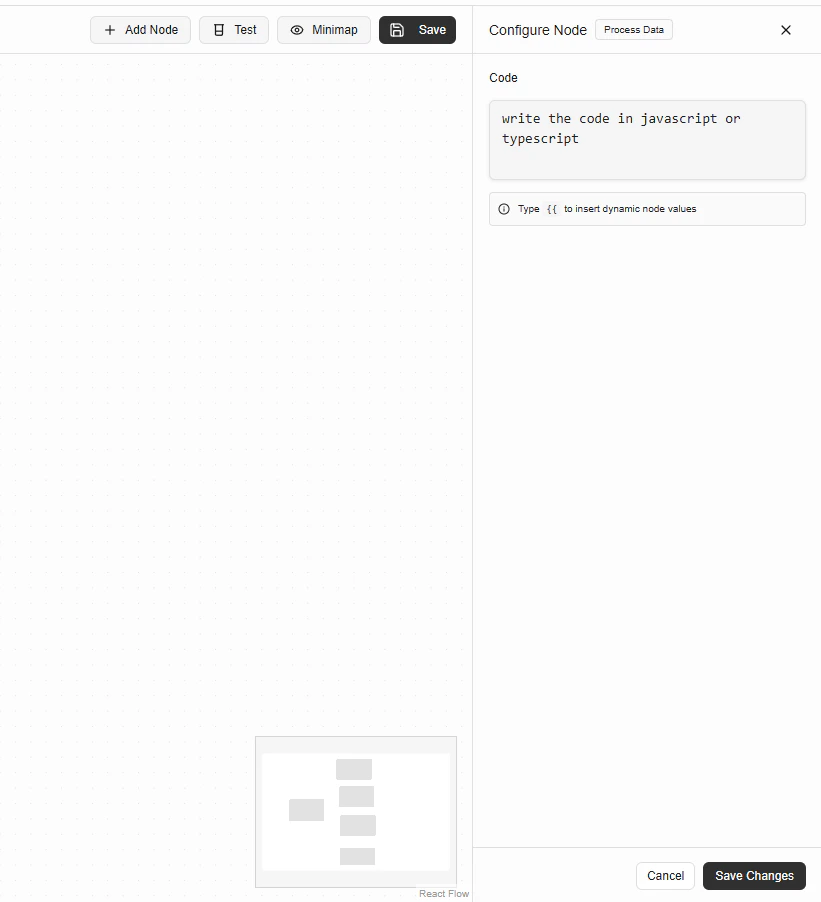
Configuration
Code
The Code field accepts JavaScript or TypeScript. You can reference outputs from previous nodes using dynamic values.
Tip: Type {{ to insert dynamic values from earlier nodes.
Writing Logic Code
Your code runs in a secure sandboxed environment. You can:- Declare variables
- Perform calculations
- Create objects and arrays
- Return a value
Example: Transform input data
Using Dynamic Values
Dynamic values are injected using the{{ }} syntax.
They can come from:
- Request Parameters Node
- Condition Node
- Database Node
- JWT Node
Returning Data
The return value of the Logic Node becomes its output. This output is available to all downstream nodes.Example return value
Execution Rules
- Code must return a value
- Execution is synchronous
- Errors thrown will stop workflow execution
- Only supported JavaScript/TypeScript features are allowed
Common Use Cases
- Data normalization
- Aggregations
- Conditional transformations
- Building response objects
- Preparing database payloads
Error Handling
If your code:- Throws an error
- Returns
undefined