

Request Parameters Node
The Request Parameters Node is used to extract, validate, and structure input data from an incoming API request. It allows you to explicitly define what data your API expects and where it should be read from, making workflows predictable, secure, and easy to debug. This node typically comes immediately after the API Start Node.What the Request Parameters Node Does
The Request Parameters Node is responsible for:- Extracting values from the incoming request
- Supporting multiple input sources (body, query, headers, path params)
- Validating required parameters
- Normalizing request data for downstream nodes
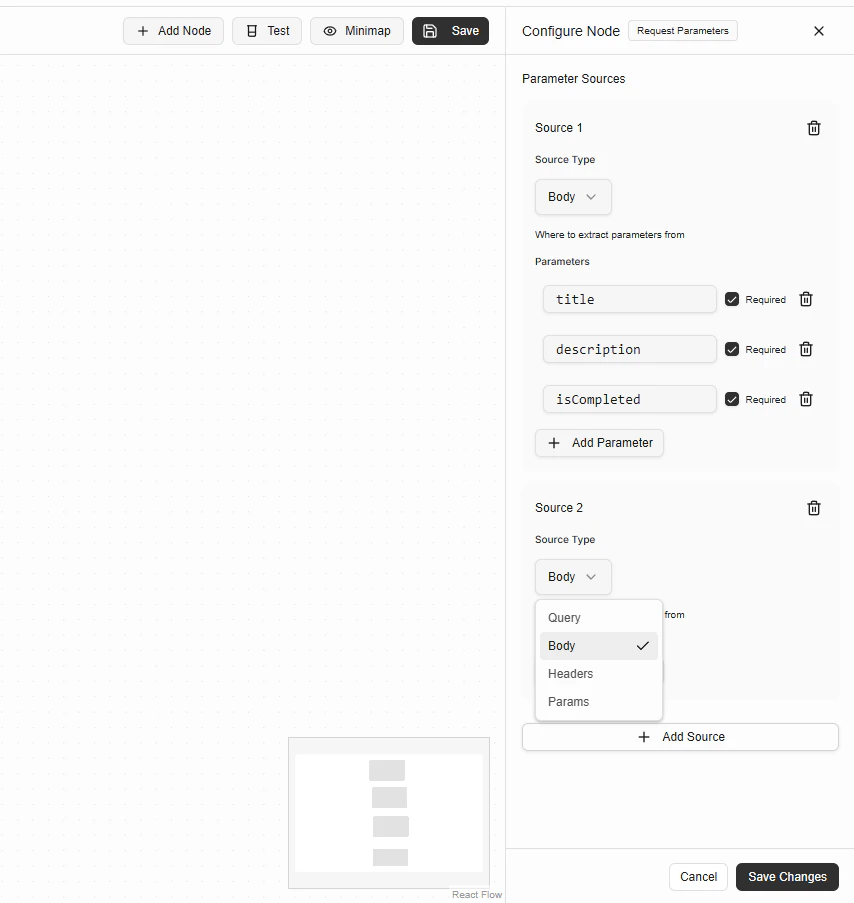
Parameter Sources
A Parameter Source defines where parameters should be extracted from. You can add multiple sources in a single node.Supported Source Types
Configuring a Parameter Source
Each source consists of:- Source Type
Where to extract parameters from (Body, Query, Headers, Params) - Parameters
A list of expected parameter names - Required Flag
Whether the parameter is mandatory
Example: Extracting Body Parameters
Configuration
Source Type:Body
Parameters:
title(required)description(required)isCompleted(required)
Multiple Parameter Sources
You can extract parameters from multiple sources in the same node.Example
Source 1- Type:
Body - Parameters:
title,description
- Type:
Query - Parameters:
userId
Required vs Optional Parameters
- ✅ Required parameters must be present
- ❌ Optional parameters may be missing
- Workflow execution stops
- An error response is returned automatically
Output Data
After execution, the Request Parameters Node outputs a structured object containing all extracted parameters. Example output:- Logic Node
- Database Node
- API Response Node
- JWT Node